A kitchen display (KDS) for your restaurant, on iPad
The paper ticket becomes a screen: the cook sees his order and moves it himself.
Built forRestaurantsKitchens with sectionsQuick service
We set you up remotely, anywhere in Saudi Arabia
The ticket goes from the till to the screen
The moment the till sends an order to the kitchen its ticket appears on the screen: the order number, the items and their quantities, the guest’s notes, and how many minutes it has been waiting. The screen refreshes itself.
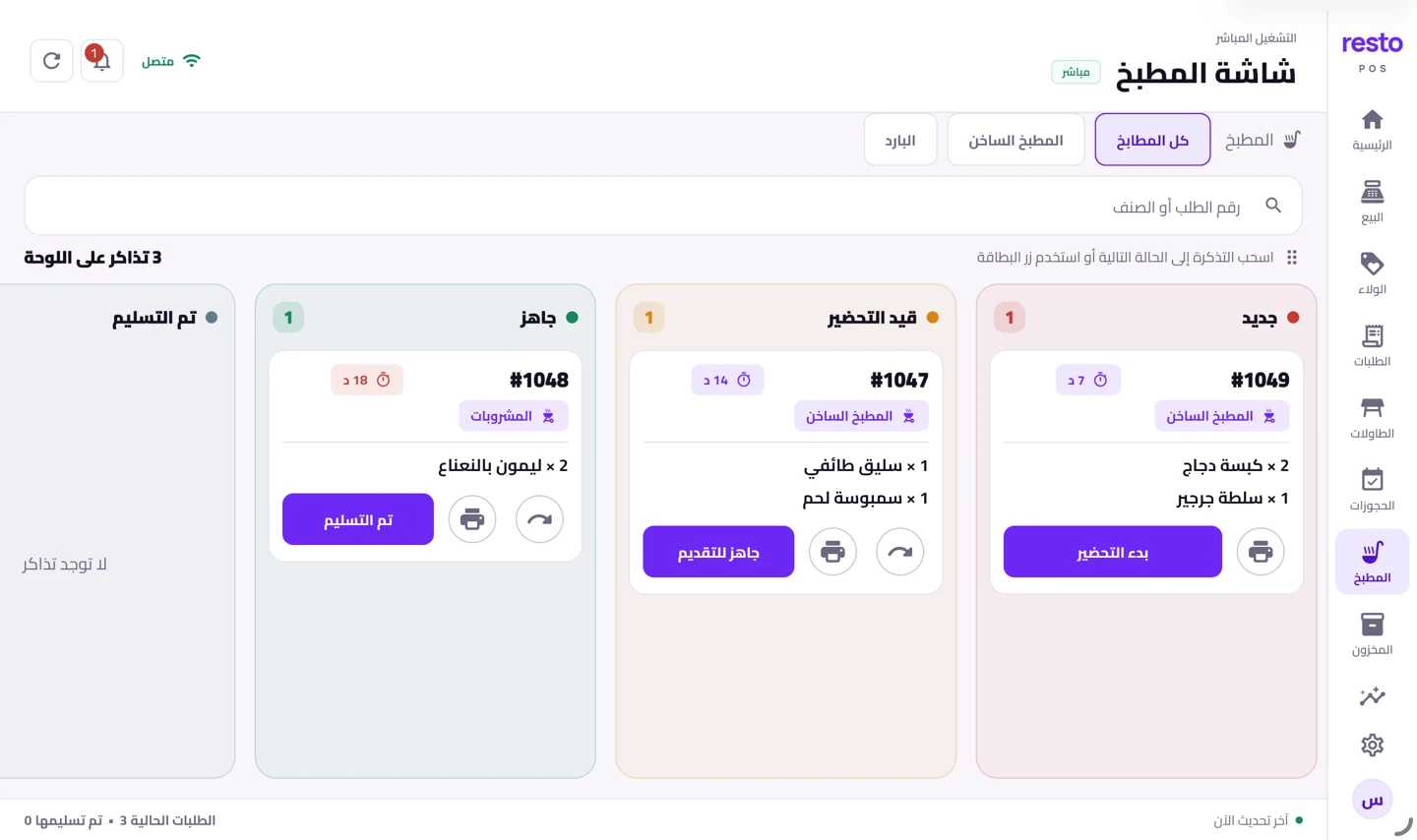
Four states: new, preparing, ready, served
The cook presses «start preparing», then «ready to serve», then «served», or drags the card to the next column. Everyone with the screen open sees the same state at the same moment.
A section for each kitchen
Split your kitchen the way it is split on the floor: hot, cold, drinks. Each section sees its own tickets, and you can open «the whole kitchen» on one screen when you want the full picture.
Printed tickets on every operations plan, the screen on the Growth plans
Preparation tickets print on each section’s printer on every operations plan. The kitchen screen needs a second device, and it comes with the Growth and multi-branch plans alongside inventory.
How to start
- Choose a Growth planThe second device and the kitchen screen come with it.
- Split your kitchenHot, cold and drinks, with each dish under its section.
- Mount the screenAn iPad or Android device in the kitchen, signed in to your account.
Plans
Every plan and its price is on the home page, with no binding contract.
See the plansCommon questions
Do I need a second device for the screen?
Yes. The screen runs on its own device in the kitchen, an iPad or an Android device. The Growth plan gives you a second device: another till or a kitchen screen.
Can I print the ticket instead?
Yes. Printed preparation tickets are on every operations plan and print to each section’s printer. The screen replaces or joins them, as your kitchen prefers.
Does the screen refresh itself?
Yes. New tickets appear and their states change with nobody reloading the page, and every open device sees the same board.
What does the screen do that paper does not?
Paper says what to make. The screen says how long the order has been waiting and which stage it is at, and keeps the ticket in front of the cook until he hands it over.
Put a screen in your kitchen
Mount a device in the kitchen and watch an order travel to it from the till. Try it with no bank card.
Try it free